
Get started with Axis Cloud
Axis Cloud gives you your own secure personal server, live in about 30 seconds. You sign in with your Axis account and use it from your phone, your laptop, any browser, or from Claude and ChatGPT. There is no app to download, no network to set up, and no server to look after.
Guided mission
From checkout to your first chat
The whole path happens in one browser tab.
Choose Axis Cloud
Pick the Cloud plan on tryaxis.so and sign in with email or Apple.
Pay
Checkout runs through our payment partner. Your server starts setting up the moment payment clears.
Watch it come up
The same tab shows each setup step with a timer, then opens your server.
Connect a model
Sign in with Claude, ChatGPT, or another provider, or paste an API key.
Start working
Create a Space, ask for something real, and pick it up from any device.
What you get
Section titled “What you get”- Your own server. A dedicated machine that runs only your Axis. Your projects, chats, Docs, memory and files live on it, not in a shared pool.
- Your own address. Your server lives at
https://<your-name>.cloud.tryaxis.so. Bookmark it on every device you use. - Sign-in at the door. Nobody reaches your server without signing in to the Axis account that owns it. See Security and data for how that works.
- Nightly encrypted backups, plus an extra backup before every update or resize.
- Claude and ChatGPT access through your server’s own connector. See Use Axis from Claude or ChatGPT.
- Always on. Routines, sub-agents and long jobs keep running after you close the tab or turn off your laptop, because they run on your server, not on your device.
Set it up
Section titled “Set it up”- Go to tryaxis.so and choose Axis Cloud.
- Sign in with your email (we send a short code) or with Sign in with Apple.
- Complete checkout. Payment is handled by our payment partner, not stored by Axis.
- Stay on the page. After payment you return to a setup screen that shows four steps with the time elapsed. When your server is ready, the same tab opens it and signs you in. You do not sign in a second time.
- Connect at least one model provider when Axis asks. You can use a subscription sign-in (for example Claude Pro or Max, or ChatGPT Plus or Pro) or an API key from any supported provider. See Model providers.
- Create your first Space and ask for something you actually need done.
If the payment confirmation is slow, the setup page waits for it and says so. If setup ever takes unusually long, the page tells you your payment is safe and gives you Check again and a way to reach support. Nothing is charged twice.
Open it from any device
Section titled “Open it from any device”Open your server’s address in any modern browser: phone, tablet, laptop, or a borrowed computer. Sign in with your Axis account and you are back in the same Spaces, chats and Docs, exactly where you left them.
- Returning later. If your sign-in has expired, your address sends you to the Axis sign-in page and then straight back to the page you asked for. A sign-in lasts 24 hours on each browser.
- Shared computers. Use a private browsing window, and close it when you are done.
- Add it to your home screen. On a phone, use your browser’s “Add to Home Screen” to open Axis like an app.
- Mac app (optional). The Mac app is there if you prefer a desktop window, but you never need it for Axis Cloud.
Plans and upgrades
Section titled “Plans and upgrades”Axis Cloud comes in four sizes, from $29.99 a month, with nothing else to pay for hosting and no cloud account of your own. Model usage is billed by the provider you connect, under your own account. See tryaxis.so for the current sizes and prices.
| Size | Price | Good for |
|---|---|---|
| Cloud Lite | $29.99 a month | About 3 to 6 agents working at once |
| Cloud | $49.99 a month | About 8 to 14 agents working at once |
| Cloud Plus | $89.99 a month | About 16 to 28 agents working at once |
| Cloud Max | $169.99 a month | About 32 to 56 agents working at once. Servers in Europe only. |
Your server watches its own memory, CPU and disk. If your work outgrows it, Axis shows a notice in the app suggesting a larger size before you run out of room. You can change size in Settings: moving up resizes the server with a short restart and charges the difference; your projects and files stay put.
For multiple live servers in different regions that mirror and back each other up, talk to us about Enterprise: contact@tryaxis.so.
If you cancel
Section titled “If you cancel”- You cancel: your server keeps running until the end of the period you paid for.
- A payment fails: your server keeps running for 48 hours while you update your payment method.
- Either way, we email you a link to a full export of your server, plus the date it will stop and the date it will be deleted.
- After it stops, we keep a private copy for 14 days. Resubscribe within that window and your same server comes back with everything on it. After 14 days the server, its copy and its backups are deleted.
Prefer to run it yourself?
Section titled “Prefer to run it yourself?”You can still install Axis on your own Mac or Linux machine and reach it through your own private network. See Self-host Axis.
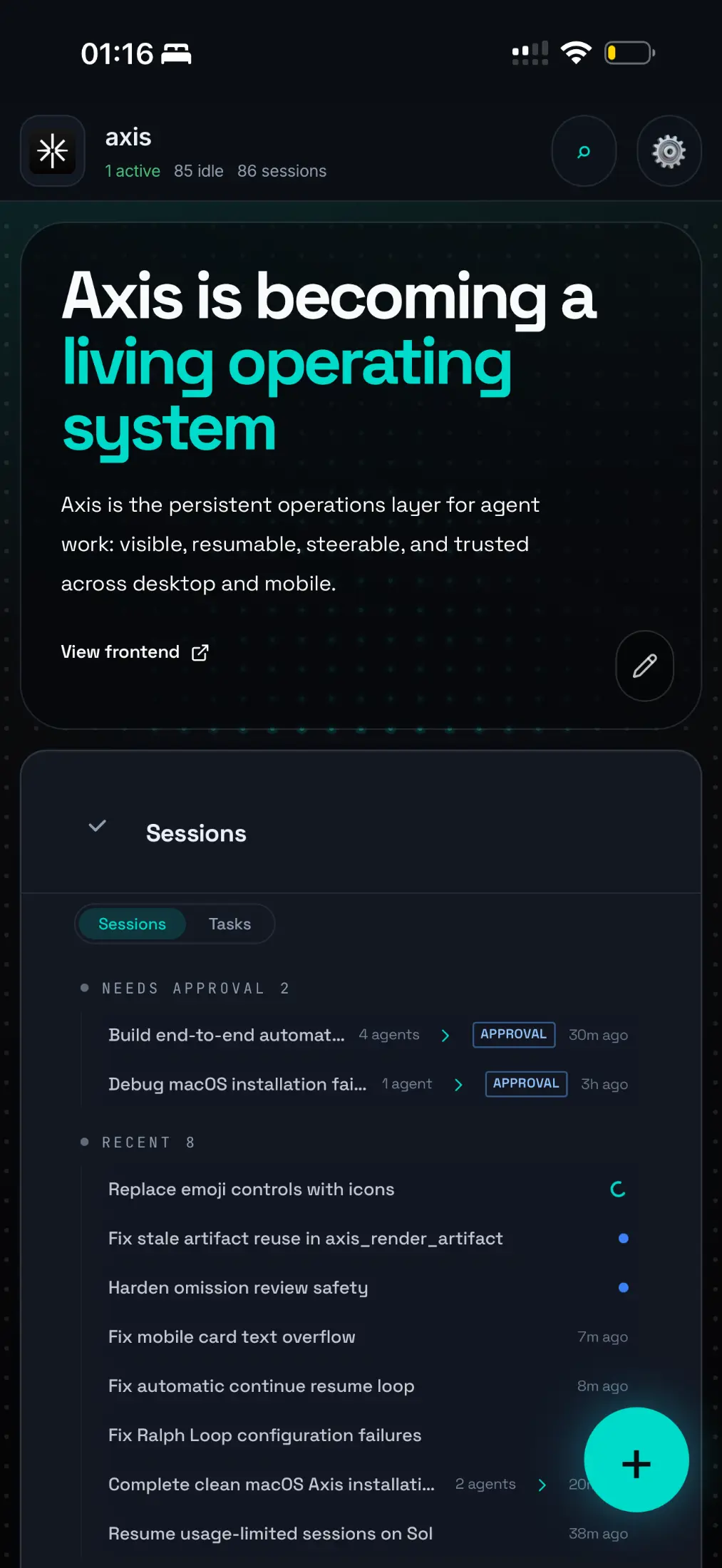
Real Axis UI with deliberately seeded, privacy-safe demonstration content.