
Sessions and steering
A session is a continuing thread of work with one agent, bound to a project. It keeps the request, working history, draft, evidence surfaces, and status together so you do not reconstruct the task after every interruption.
Proof sequence
See a session while it works
Each image demonstrates a different session state, not a repeated overview.
Inspect active work
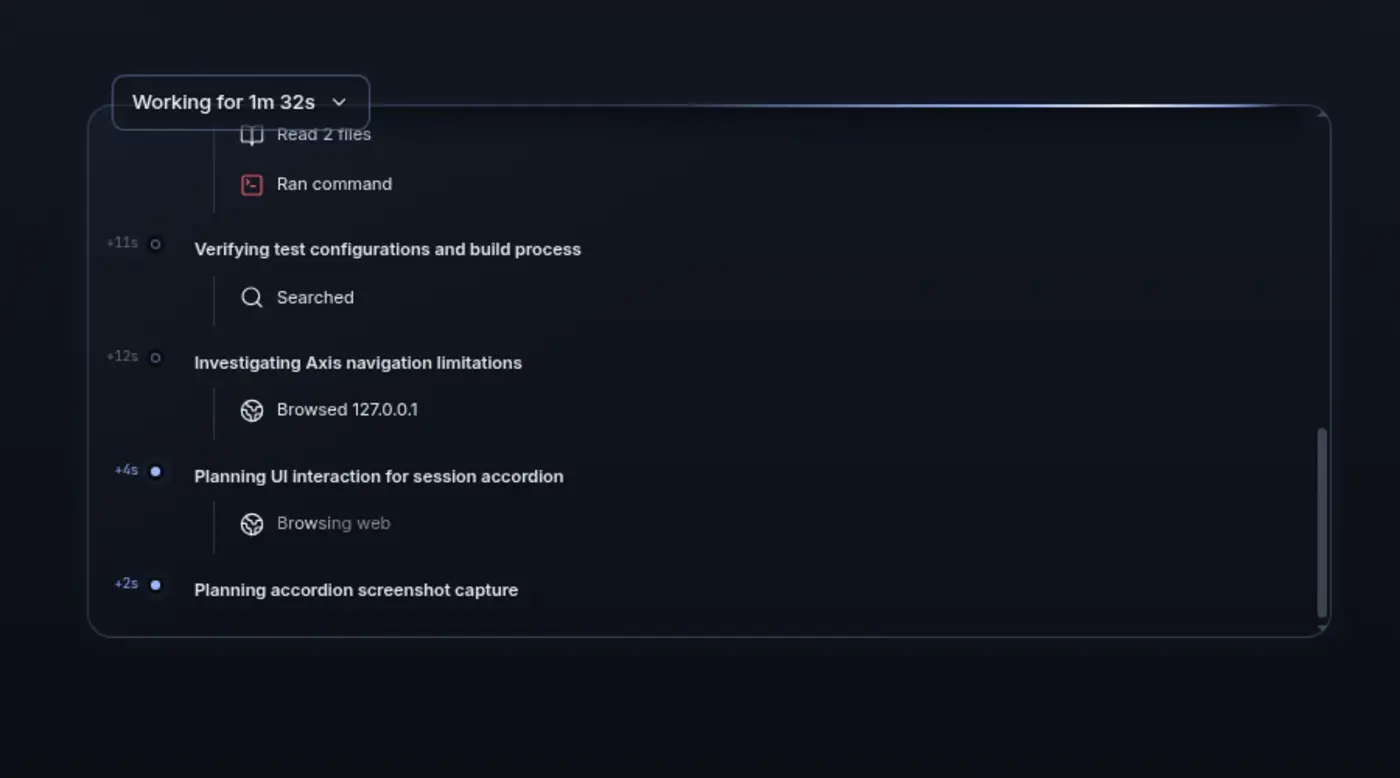
Open Working to follow the agent’s reasoning and actions in chronological order. Queue the next instruction
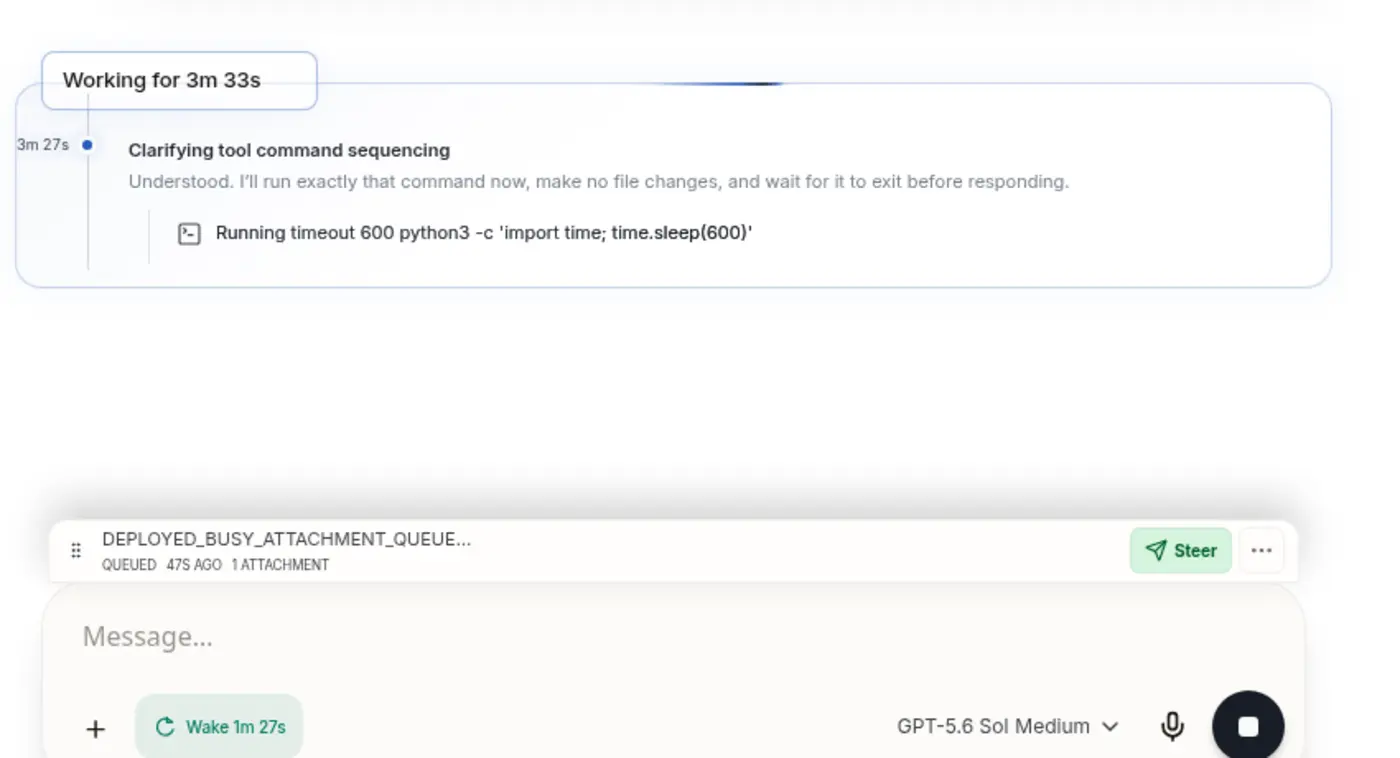
A follow-up waits visibly while the current turn continues, ready to reorder, edit, delete, or steer through. Review the evidence
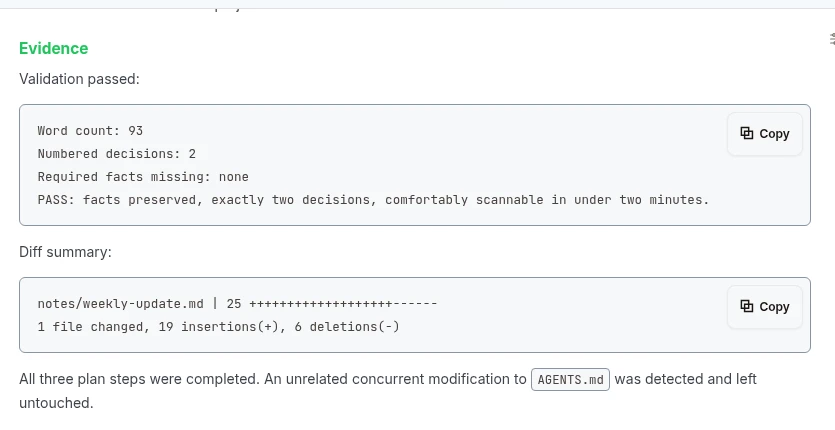
When work settles, its measurable proof stays attached to the thread.
Start from an outcome
Section titled “Start from an outcome”A new session is Ready until you send its first request. That first request defines the thread. Keep using the session while the objective and its evidence remain coherent; start another when the goal truly changes.
Axis titles the session from the work rather than the project directory name.
Read the transcript in layers
Section titled “Read the transcript in layers”- Your requests remain visible as the human intent.
- One Working fold owns the reasoning and tool activity for an active turn.
- The conclusive response remains outside that fold as readable text.
- Open actions expose evidence such as changed lines, command output, file previews, browser steps, and inspected images.
The fold becomes Worked after the turn settles. It stays available without flooding the main conversation.
Steer without losing the message
Section titled “Steer without losing the message”Send a follow-up during active work and it enters the steering queue. Pending rows can be reordered. Editing withdraws the queued version and returns its text and attachments to the composer; deleting removes that pending instruction.
Pressing Enter on a truly empty composer explicitly steers the oldest queued item
through immediately. Use that to change the current direction, not as a routine send.
Interrupt when meaning is wrong
Section titled “Interrupt when meaning is wrong”The primary composer control shows Stop only while work is cancelable and there is nothing sendable. Type or attach something and it becomes Send, allowing the next instruction to queue while the current turn continues.
Stop when the objective, risk boundary, or customer trade-off is wrong. Do not stop only to inspect reversible details—the Working fold already preserves those.
Message across sessions
Section titled “Message across sessions”Axis agents can send context, instructions, and results directly to another exact session. The destination does not have to live in the same workspace: a session can coordinate with work in another project or workspace without asking you to copy and paste the conversation between them.
Cross-session messaging preserves the destination session’s identity and existing context. Use it to hand off a focused next action, return evidence to a coordinating session, wake related work, or connect outcomes that span workspace boundaries. The message becomes part of the receiving thread rather than an unauditable side channel.
This is different from spawning a sub-agent. Spawn a child when one session should own and coordinate delegated work; message an existing session when the right thread and context already exist elsewhere.
Follow plans without creating a second transcript
Section titled “Follow plans without creating a second transcript”When a session uses a multi-step plan, a compact step indicator appears above the composer. The checklist remains visible across turns until complete. Outcomes that outlive one chat belong on the Space’s Up next list, not a checklist lost with one turn.
Recover the same thread
Section titled “Recover the same thread”Axis keeps durable identity separate from live connection state. Closing a browser tab, losing network access, or remounting the interface should not create a replacement conversation. Reopen the exact session.
Drafts, queued input, transcript history, and attached surfaces are designed to recover from the durable record. The host still needs to be running for active work to continue.
Rendered and Raw
Section titled “Rendered and Raw”Rendered is the human surface: conversation, Working folds, plans, approvals, and evidence. Raw is the exact agent terminal surface for diagnosis. They are two views of the same session; Raw is not a second agent.
Use Rendered for normal work. Use Raw when a provider error, prompt-delivery problem, or terminal-level state needs exact inspection.
Human-facing state
Section titled “Human-facing state”A session may be working, waiting on you, or settled. If the agent requires an answer, login, credential action, or approval, the session remains open and appears in the sidebar’s Needs approval group. Waiting and done are not the same state.
See Understand session states for the complete guide to Pinned, Needs approval, Unread, In progress, and the states shown inside a session.
Mission complete when
Section titled “Mission complete when”You can leave the session, return to the same identity, inspect the full intent and evidence, and continue without pasting the context again.