
Generative UI
When an answer is easier to see than to read, Axis agents draw it. A status update becomes a small dashboard with metrics and a checklist. A comparison becomes a table. A travel plan becomes an illustrated page with real photos. A question that needs your decision becomes a form you can answer with a tap. It all appears inside the conversation, attached to the request that produced it.
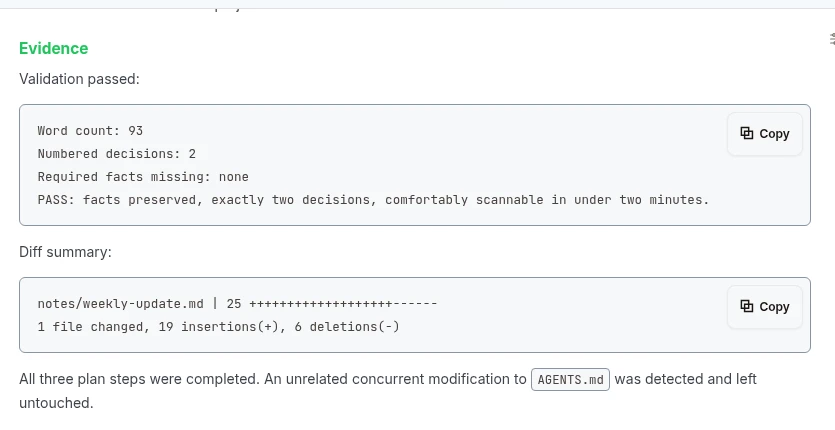
Real Axis UI with deliberately seeded, privacy-safe demonstration content.
What agents can show you
Section titled “What agents can show you”| You see | Good for |
|---|---|
| Dashboards and cards | Status, metrics with trends, callouts, step-by-step progress |
| Tables and charts | Comparisons, bar charts, sparklines, timelines |
| Editorial pages | Itineraries, place guides and stories, with freely licensed photos and their credits |
| Interactive visuals | Anything the standard pieces cannot express: a chess board, a custom diagram, a small game or simulation |
| Media mosaics | An image, a video and audio composed as one story |
| Decision forms (Asks) | Approvals, choices and short answers the agent needs from you |
It builds while you watch
Section titled “It builds while you watch”Generative UI streams. The layout appears first, then styles ease in, then the numbers and text fill in, without flicker or reloading. Older answers in your history show their finished state instantly.
Most of it uses Axis’s own components, so it matches the app’s look in light and dark mode. Free-form interactive visuals run in a sandboxed frame inside the message, so they cannot reach your account or the rest of the page.
Asks: decisions without hunting
Section titled “Asks: decisions without hunting”When an agent needs something only you can decide, such as approving a send, picking between design directions or confirming a scope, it asks with a form right in the chat: choices, yes or no, short text, and visual options shown as images. Your answer is saved with the session, the agent picks up exactly where it stopped, and anything waiting on you shows in Needs you on the Space page and in the Inbox.
When to ask for it
Section titled “When to ask for it”You rarely need to. Agents choose a visual answer when structure helps. You can also just ask:
Show me this week's sales against last week as a small dashboard, with the threebiggest changes called out.Compare these four vendors in a table: price, contract length, support hours andthe one risk you'd worry about.For something you will edit, keep or share, ask for a Doc, Slides deck or app instead. Those live in your Space and can be published as a link.
Interfaces never act on their own
Section titled “Interfaces never act on their own”A generated interface shows information and collects your answer. It is not permission to send, publish, pay or delete. Those still go through the approval you see in the Ask, and only the action you approved is carried out.