
How the harness works
Axis is easiest to understand as one work lifecycle, not a list of features.
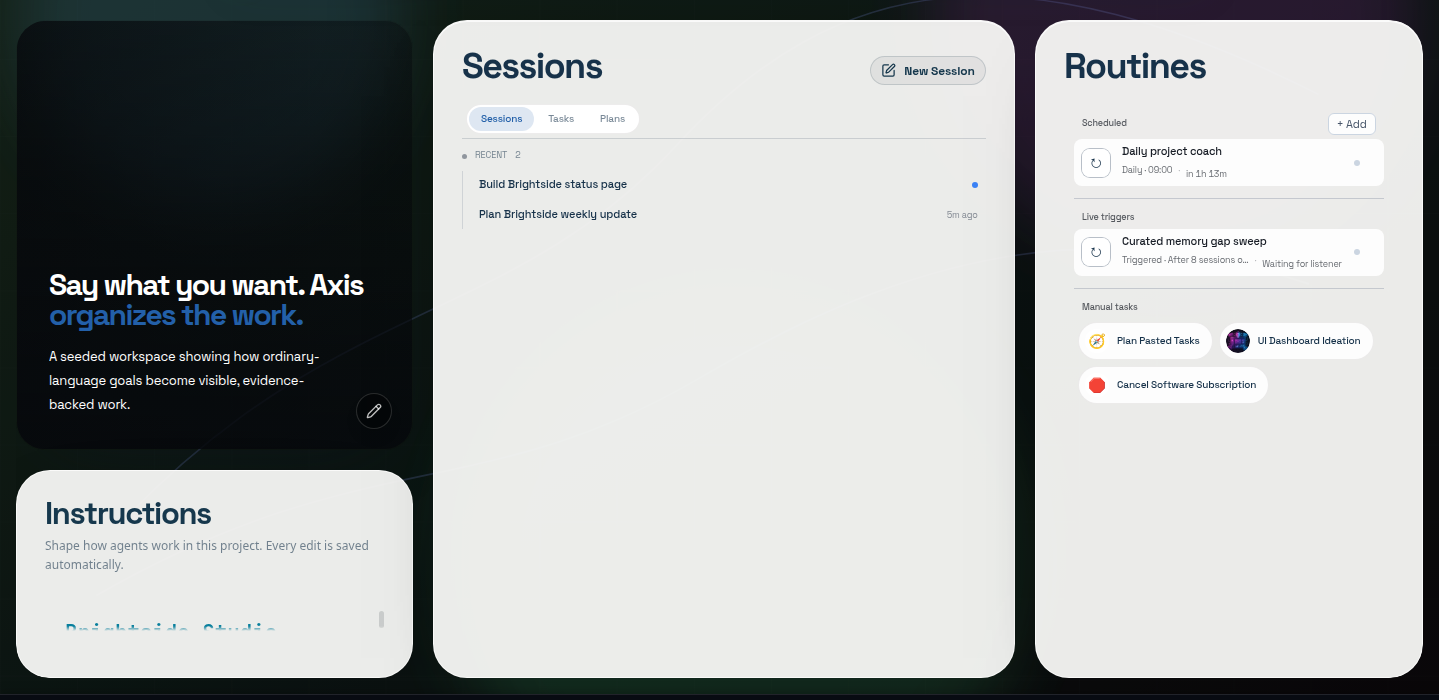
Project-owned navigation
Routines, Collections, Memories, Files, and Skills are scoped to this durable home.
Working agreement
Standing rules are available before the next session begins.
Continuing sessions
Business and technical outcomes keep separate, resumable identities.
Repeatable work
Scheduled, triggered, and manual Routines remain visible instead of becoming hidden automation.
1. Context: start in the right operating environment
Section titled “1. Context: start in the right operating environment”A project is the durable home for related work. It scopes sessions, files, instructions, skills, Spaces, services, Routines, Collections, and history.
AGENTS.md is the project’s working agreement: standing rules every agent should begin with automatically. Memory adds learned decisions and lessons relevant to the request. Files and connected source systems remain authoritative for current state.
Boundary card: rules, knowledge, and truth
Section titled “Boundary card: rules, knowledge, and truth”| Surface | Job |
|---|---|
| AGENTS.md / project instructions | How work should be done here |
| Memory | What was learned and may matter again |
| Project files and connected systems | What is true now |
| Session history | What happened and what supports the result |
2. Continuity: keep work attached to its identity
Section titled “2. Continuity: keep work attached to its identity”A session is a continuing thread of work with one agent—not a disposable chat. It holds the conversation, folded work, draft, status, and the surfaces opened for that work.
A workspace is the session’s coherent view: transcript plus tabs such as browser, preview, Collection item, service shell, terminal, or agent graph. A pane stays attached to the session that created it so evidence does not become an orphaned window.
A workstream folder groups related sessions and records purpose, decisions, blockers, resources, and next action.
3. Control: make work and judgment visible
Section titled “3. Control: make work and judgment visible”The Working fold presents one chronological rail for a turn. Actions disclose their actual evidence when opened. The steering queue lets you redirect active work without losing a message.
The Inbox collects questions, approvals, and other human actions that genuinely block progress. An approval is a narrow authority boundary, not a generic “agent got stuck” state.
Boundary card: status has two layers
Section titled “Boundary card: status has two layers”- Human-facing activity describes what you see now: working, waiting on you, or settled.
- Durable workflow status tracks lifecycle in records, such as backlog, todo, in-progress, review, done, or cancelled where that object supports those states.
Do not treat those two vocabularies as one universal enum.
4. Coordination: share intent and converge branches
Section titled “4. Coordination: share intent and converge branches”A Space groups one area of work with a home page, and its Up next list holds the outcomes still to deliver, which multiple sessions can continue. An agent’s checklist holds the steps one chat is taking toward one of those outcomes. A sub-agent is a focused branch of a larger goal; the parent remains responsible for convergence and integration:
1 goal → N focused branches → 1 validated result
A Routine is a reusable workflow. Scheduled, manual, or event-triggered runs should create or resume visible sessions with history and the same approval boundaries as interactive work.
5. Learning: keep what should outlive the turn
Section titled “5. Learning: keep what should outlive the turn”Memory preserves deliberate lessons, preferences, decisions, and references. Collections is the project-scoped home for durable saved material; an artifact is a saved item type, not a competing destination.
Evidence connects the entire model. A claim should lead to the exact changed state, test, browser view, saved result, or recorded side effect that supports it.
The lifecycle in one line
Section titled “The lifecycle in one line”Guided mission
Follow one real outcome
Intent
Say what you want
Use ordinary language.
Context
Enter the harness
Project, rules, memory, tools, and plan.
Execution
Keep work visible
A continuing session owns the work and its surfaces.
Judgment
Decide what matters
Inspect proof and authorize narrow consequential actions.
Learning
Start ahead next time
Preserve useful rules, lessons, results, and open work.
Every major Axis surface exists to remove friction from one of those transitions.